
SUMMARY
- Before authorizing collision repairs, municipal fleet managers should document the vehicle, incident, visible damage, operational condition, estimate, repair recommendations, and approval information.
- Start with accurate vehicle identification, including the VIN, unit number, year, make, model, department, configuration, mileage, and installed equipment or upfits.
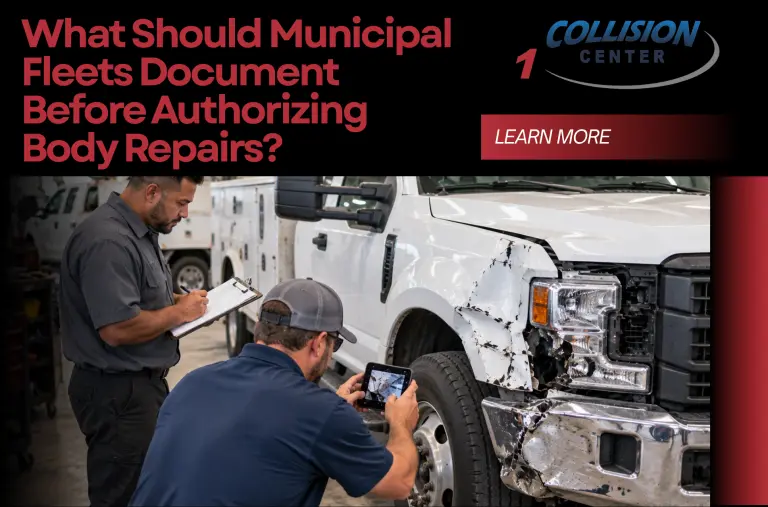
- Take clear photographs of the damaged areas and, when practical, the entire vehicle. This creates a record of its condition before repairs begin.
- Separate collision-related damage from pre-existing damage whenever possible so everyone understands what the current repair authorization covers.
- Ask the repair facility what has already been confirmed and what may require disassembly, measurement, diagnosis, or additional inspection.
- Keep the initial estimate, later supplements, parts information, insurance or claim information, and internal approvals together in the vehicle’s repair record.
- Municipal vehicles may contain specialized equipment such as service bodies, emergency lighting, communications equipment, lift equipment, tool storage, or other upfits that should be identified before repairs are authorized.
- Establish who has authority to approve the initial repair and who can authorize additional work if hidden damage is discovered.
- Documentation should continue through the repair. A supplement should explain what additional collision damage or repair operations were identified after the original estimate.
- Municipal fleet managers in the Farmington area can discuss commercial and fleet collision repairs with Airlake Collision Center 1, 22096 Canton Cir, Farmington, MN 55024.
Why Should Municipal Fleets Document a Vehicle Before Body Repairs Begin?
Municipal fleets often operate differently from privately owned vehicles.
A city, county, public works department, utility department, parks department, or other public organization may need to track:
- Which vehicle was damaged
- How the incident occurred
- What damage was identified
- What repairs were authorized
- Who approved the work
- Whether additional repairs were added
- What the final repair cost included
That makes documentation an important part of fleet vehicle collision repair.
Good records create a clear path from:
collision → inspection → estimate → authorization → repair → final documentation
The goal is not paperwork for the sake of paperwork.
It is making sure the fleet understands what it is approving and has a useful record after the vehicle returns to service.
Step 1: Record the Vehicle’s Unit Number
Start with the fleet’s internal identifier.
Municipal fleets commonly manage many vehicles that may look similar.
Record the:
- Unit number
- Asset number
- Department assignment
This helps prevent confusion between vehicles.
For example, instead of recording only:
2024 white work truck
the repair file might identify:
Public Works Unit 214
That gives everyone a consistent reference.
Step 2: Record the VIN
The Vehicle Identification Number is particularly important.
The VIN can help identify the specific:
- Vehicle
- Model year
- Configuration
- Parts information
Collision repair decisions should be based on the actual vehicle being repaired.
Do not rely only on a general description such as:
Ford truck
or:
Freightliner
The repair facility needs enough information to research the correct vehicle.
Step 3: Record the Year, Make, and Model
Along with the VIN, document:
- Model year
- Manufacturer
- Model
This basic information should appear consistently throughout the repair record.
It can help when reviewing:
- Estimates
- Parts
- Insurance documents
- Internal fleet records
- Final invoices
Step 4: Document the Vehicle Configuration
Commercial and municipal vehicles can have very different configurations even when they share the same basic chassis.
Document relevant information about the vehicle, such as:
- Cab configuration
- Wheelbase when relevant
- Body type
- Truck class
- Installed equipment
- Upfits
Airlake Collision Center 1 handles commercial vehicle collision repair as well as medium-duty truck collision repair, making accurate vehicle identification particularly important when specialized trucks are involved.
Step 5: Identify the Department Using the Vehicle
Record which department operates the vehicle.
Examples might include:
- Public works
- Parks
- Streets
- Utilities
- Facilities
- Administration
This provides operational context.
A damaged vehicle used daily for road maintenance can create a different scheduling problem from a vehicle with several available substitutes.
Department information can also help determine:
- Who should receive updates
- Who can authorize repairs
- Who needs to plan around downtime
Step 6: Record the Mileage
Document the mileage when the vehicle enters the repair process.
Mileage can become part of the vehicle’s maintenance and repair history.
It also helps create a clear record of the vehicle’s condition at a specific point in its service life.
Step 7: Document the Date of the Incident
Record when the collision occurred.
Include:
- Date
- Approximate time when available
- Incident or claim number when applicable
This connects the body repair documentation with the municipality’s other incident records.
Step 8: Document How the Collision Happened
The repair facility does not need a long story.
But a basic description of the impact can be useful.
For example:
- Rear-ended while stopped
- Driver-side impact at intersection
- Front corner struck fixed object
- Vehicle backed into equipment
- Side of truck contacted another vehicle
Impact information can help technicians understand where collision forces may have traveled.
Step 9: Record the Point of Impact
Be specific about where the vehicle was hit.
Examples include:
- Left front
- Right front
- Driver door
- Passenger side
- Left rear
- Right rear
- Rear center
- Wheel area
A front-wheel impact may create different inspection priorities from a dent confined to a rear body panel.
The repair facility still needs to inspect the vehicle, but knowing the impact location provides useful context.
Step 10: Photograph the Entire Vehicle
Do not photograph only the dent.
When practical, capture views of the:
- Front
- Rear
- Driver side
- Passenger side
Then take closer photographs of the damaged areas.
This creates a broader record of the vehicle’s pre-repair condition.
Step 11: Take Close-Up Photos of the Collision Damage
Capture the damaged area from multiple angles.
Photograph:
- Dents
- Scratches
- Cracks
- Broken lamps
- Bent components
- Damaged mirrors
- Wheel damage
- Other visible collision conditions
Good photographs help document what was visible before disassembly.
They can also make later internal review easier.
Step 12: Document Pre-Existing Damage
Municipal fleet vehicles can accumulate wear and minor damage over time.
Before authorizing the new collision repair, identify known pre-existing conditions when possible.
Examples could include:
- Old dent on another panel
- Previous bumper scrape
- Existing paint damage
- Previously cracked trim
Separating old damage from new collision damage helps define what the current repair authorization covers.
Why Is Pre-Existing Damage Documentation Important?
Imagine a municipal truck enters the shop after a front-end collision.
It already has a dent on the passenger-side bed from an older incident.
Without documentation, someone reviewing the repaired vehicle later may ask:
“Why wasn’t this dent repaired?”
The answer may simply be that it was not part of the current collision.
A pre-repair record helps prevent that confusion.
Step 13: Document Whether the Vehicle Can Be Operated
Record the vehicle’s condition after the accident.
For example:
- Vehicle transported to shop
- Vehicle driven to shop
- Vehicle removed from service
Do not use the fact that the vehicle can still move as proof that it has only cosmetic damage.
A vehicle may still operate while requiring inspection of collision-affected components.
Step 14: Record Any Driver-Reported Changes
Ask the operator whether anything changed after the collision.
Useful observations can include:
- Steering feels different
- Vehicle pulls
- New vibration
- Door no longer closes normally
- Hood does not latch normally
- New warning light
- New fluid leak
- Lighting stopped working
- New noise
Driver observations are not a diagnosis.
They give the repair facility additional information to investigate.
Step 15: Document Dashboard Warning Messages
If warning lights or messages appeared after the collision, photograph them when practical.
Record what the driver saw.
Examples can involve:
- ABS
- Stability system
- Airbag system
- Driver-assistance system
- Other vehicle warnings
A warning message can disappear later.
Having a photograph or written record can still provide useful information during diagnosis.
Step 16: Identify Specialized Municipal Equipment
This step can be especially important.
Municipal vehicles may have equipment that was not part of the original base vehicle.
Examples can include:
- Service body
- Utility body
- Tool storage
- Emergency or warning lights
- Communications equipment
- Lift equipment
- Hydraulic equipment
- Snow-related equipment
- Other vocational upfits
Document what is installed and whether the collision occurred near it.
Step 17: Record Upfit Manufacturer Information When Available
A commercial vehicle may combine components from multiple manufacturers.
For example, the truck chassis may come from one manufacturer while the body or equipment comes from another.
Record available:
- Manufacturer names
- Model information
- Serial numbers
- Equipment identification
This can help with:
- Parts research
- Repair information
- Replacement component identification
It can be particularly useful during heavy-duty truck collision repair.
Step 18: Document Removable Equipment and Fleet Property
Before leaving the vehicle for repair, identify municipal property stored inside or attached to it.
Depending on fleet policy, this could include:
- Tools
- Electronics
- Documents
- Removable equipment
- Personal items
Remove items that do not need to remain with the vehicle when practical and permitted by the organization.
This keeps the repair process focused on the vehicle and its installed equipment.
Step 19: Obtain the Initial Repair Estimate
The initial estimate should document the damage that can reasonably be identified during the first inspection.
Depending on the collision, it may contain:
- Parts
- Body labor
- Mechanical labor
- Refinishing
- Remove-and-install operations
- Diagnostic procedures
- Alignment
- Structural operations
The estimate is more useful when fleet managers understand what each major section represents.
Step 20: Ask What Has Actually Been Confirmed
Before approving the estimate, ask:
“Which damage has been confirmed?”
There is an important difference between:
- Visible confirmed damage
- Suspected damage
- Areas that still require inspection
A clear repair plan should distinguish between them.
Step 21: Ask What Still Requires Disassembly
Some damage cannot be completely inspected while the vehicle remains assembled.
The shop may need to remove:
- Bumper
- Grille
- Lamp
- Door trim
- Body panel
- Step
- Other damaged components
This can expose:
- Broken brackets
- Hidden mounting damage
- Wiring damage
- Additional body damage
Before authorizing repairs, municipal fleet managers should understand where these unknowns exist.
Step 22: Ask Whether Measurement Is Needed
Some collisions may warrant structural or dimensional measurement.
Others may not.
Measurement might be considered when technicians identify clues such as:
- Significant collision force
- Changed body alignment
- Multiple uneven gaps
- Visible structural deformation
- Changed wheel position
The I-CAR Repairability Technical Support Portal provides collision professionals with resources for researching vehicle-specific repair procedures and repairability information.
Ask whether measurement is needed and why.
Step 23: Document Wheel and Tire Damage
If the collision involved a wheel, record it clearly.
Photograph:
- Wheel damage
- Tire damage
- Changed wheel position
Tell the repair facility if the wheel received direct impact.
The National Highway Traffic Safety Administration provides information about tire inspection and condition.
A tire remaining inflated does not by itself confirm that the wheel-and-tire area escaped collision damage.
Step 24: Document Steering or Suspension Concerns
If the vehicle was hit around a wheel or lower body area, record driver-reported symptoms such as:
- Pulling
- Vibration
- Off-center steering
- New noise
- Different handling
The repair facility can then determine whether inspection of relevant:
- Steering components
- Suspension components
- Wheels
- Tires
is appropriate.
An alignment should not be used as a substitute for identifying a physically damaged component.
Step 25: Document Lighting Damage
Record damaged:
- Headlights
- Taillights
- Marker lights
- Work lights
- Other exterior lighting
For municipal vehicles, also identify installed warning or specialty lighting when it was near the collision.
A lamp may still illuminate while its:
- Housing
- Bracket
- Mounting area
- Wiring
has been damaged.
Step 26: Document Mirrors and Visibility Equipment
Commercial vehicle mirrors can be large and may contain multiple features.
Record whether the collision affected:
- Mirror glass
- Housing
- Support arm
- Mounting location
- Wiring
- Adjustment functions
If the municipality has added visibility equipment such as cameras, document those components as well.
Step 27: Identify Electronic Equipment Near the Repair
Modern fleet vehicles can contain extensive electronics.
Depending on the vehicle, collision-affected areas may contain:
- Wiring
- Sensors
- Cameras
- Electronic modules
The National Highway Traffic Safety Administration explains how cameras, radar, and other sensors can support modern driver-assistance features.
Not every collision requires calibration.
Not every body repair affects electronic systems.
The repair facility should identify the equipment installed on the specific vehicle and determine what procedures apply.
Step 28: Document the Parts Approach
Before authorization, understand what parts are listed.
Ask:
- What parts require replacement?
- What components are being repaired?
- Are any parts still being researched?
- Are specialized upfit components involved?
- Are the major parts available?
This is especially important for municipal vehicles because specialized equipment can have different parts sources from the base vehicle.
Step 29: Ask About Parts Availability
A repair cannot always move directly from authorization to completion.
Some components may have:
- Supplier lead times
- Backorders
- Shipping delays
- Configuration-specific availability
For a municipal fleet, this can affect:
- Staffing
- Route planning
- Department capacity
- Temporary vehicle assignments
Ask about critical parts before building an operational plan around a specific return date.
Step 30: Document the Initial Estimated Timeline
Record the repair facility’s current timeline estimate.
Also document what that timeline assumes.
For example:
- Parts are available
- No major additional damage is discovered
- Approvals are received promptly
This creates a much more useful record than writing only:
“Expected Friday.”
Collision repair timelines can change as new information becomes available.
Step 31: Identify Who Has Repair Authorization Authority
Before work begins, document who can authorize it.
This might be:
- Fleet manager
- Department manager
- Public works director
- Purchasing representative
- Risk management representative
- Another authorized employee
The exact structure depends on the municipality.
The repair facility should know who can make decisions.
Step 32: Establish a Supplement Approval Process
What happens if additional damage is discovered?
Decide before it happens.
Document:
- Who receives supplements
- Who reviews them
- Who can approve them
- Whether a spending threshold applies
- Whether additional purchasing procedures are required
A clear approval path can reduce unnecessary delays.
Step 33: Keep the Original Estimate
Do not replace the original estimate in the file when a supplement arrives.
Keep:
- Initial estimate
- Supplement 1
- Supplement 2, if applicable
- Final invoice
This creates a timeline showing how the repair plan developed.
Step 34: Document Why a Supplement Was Added
A supplement should correspond to a change in the repair plan.
For example:
Initial Estimate
- Damaged bumper
- Broken lamp
- Dented fender
After Disassembly
Additional findings:
- Broken mounting bracket
- Hidden wiring damage
The supplement documents the newly identified operations.
This helps municipal fleet managers understand why the authorized amount changed.
Does a Supplement Mean the Initial Estimate Was Incorrect?
Not necessarily.
Some collision damage cannot be confirmed until damaged exterior components are removed.
A supplement allows newly discovered damage and related procedures to be documented.
Ask:
“What was discovered after disassembly that was not visible during the initial estimate?”
Step 35: Document Insurance or Claim Information
When insurance or another claims process is involved, keep relevant information with the repair file.
This may include:
- Claim number
- Adjuster information
- Estimate
- Supplement communication
- Approval documentation
The Minnesota Department of Commerce provides information about auto insurance and claims in Minnesota.
Municipal organizations should also follow their own insurance, risk-management, procurement, and recordkeeping requirements.
Step 36: Keep Purchase Orders and Internal Approvals With the Repair Record
If the municipality uses:
- Purchase orders
- Work orders
- Internal authorization forms
- Spending approvals
connect those records to the same vehicle repair.
That makes it easier to determine later:
- What was requested
- What was authorized
- What changed
- What was ultimately paid
Step 37: Document Repair Progress at Meaningful Milestones
Documentation should not stop when the first estimate is signed.
Useful repair milestones can include:
- Vehicle received
- Initial inspection completed
- Disassembly completed
- Repair plan confirmed
- Supplement submitted
- Major parts received
- Body repairs completed
- Refinishing completed
- Reassembly completed
- Final checks completed
This can be particularly helpful when a department needs to plan around vehicle downtime.
Step 38: Record Why the Vehicle Is Waiting
If the vehicle remains out of service, document the reason.
Examples include:
- Waiting for parts
- Waiting for authorization
- Waiting for claim response
- Active repair
- Refinishing
- Reassembly
- Final checks
This helps distinguish repair time from total calendar downtime.
It also gives municipal fleet managers useful information for future planning.
Step 39: Review the Final Invoice Against the Repair Record
When repairs are completed, compare the final invoice with:
- Original estimate
- Supplements
- Approved changes
Ask about differences you do not understand.
The goal is to have a clear record showing how the final repair scope developed.
Step 40: Keep Relevant Post-Repair Documentation
Depending on what the collision affected and which repairs were performed, documentation might include:
- Final repair invoice
- Supplements
- Parts information
- Alignment documentation
- Diagnostic documentation
- Other repair-specific records
Not every collision repair produces every type of document.
Keep what corresponds to the work actually performed.
Step 41: Photograph the Vehicle After Repairs
Post-repair photographs can complete the record.
When appropriate, photograph the same areas documented before repairs.
This creates:
before repair → repair documentation → after repair
records for the fleet file.
Step 42: Update the Vehicle’s Repair History
Once the vehicle returns to service, update its fleet record.
Record:
- Collision date
- Repair facility
- Repair completion date
- Final cost
- Major repairs performed
- Relevant documentation
This can become useful information throughout the vehicle’s service life.
A Simple Municipal Fleet Pre-Authorization Checklist
Before authorizing collision repairs, confirm that the file includes:
- Vehicle unit or asset number
- VIN
- Year, make, and model
- Department
- Mileage
- Vehicle configuration
- Upfit information
- Collision date
- Incident information
- Point of impact
- Pre-repair photos
- Known pre-existing damage
- Driver-reported symptoms
- Warning messages
- Initial estimate
- Confirmed damage
- Areas requiring further inspection
- Parts information
- Parts availability when known
- Estimated timeline
- Insurance or claim information when applicable
- Authorized decision-maker
- Supplement approval process
The municipality can adapt this checklist to its own procurement, risk-management, and recordkeeping requirements.
Frequently Asked Questions
What should a municipal fleet document before approving collision repairs?
Document the vehicle identification, department, mileage, incident information, visible damage, pre-existing damage, driver-reported symptoms, photos, initial estimate, specialized equipment, parts information, and repair authorization.
Should municipal fleets photograph vehicles before body repairs?
Yes. Pre-repair photographs can document visible collision damage and the broader condition of the vehicle before repairs begin.
Why should pre-existing damage be documented?
It helps separate older vehicle damage from the current collision and clarifies what the present repair authorization is intended to cover.
Should municipal fleet managers document upfits?
Yes. Service bodies, specialty lighting, communications equipment, hydraulic equipment, storage systems, and other upfits can affect parts identification, repair procedures, cost, and downtime.
Why can a municipal vehicle repair estimate change after authorization?
Disassembly can reveal collision damage that was hidden behind exterior components. Additional findings can result in a supplemental estimate for added parts, labor, or procedures.
Who should approve collision repair supplements?
That depends on the municipality’s internal procedures. The fleet should establish and document who has authority to review and approve additional repair work before a supplement is needed.
What should municipal fleets keep after repairs are completed?
Keep the final invoice, original estimate, supplements, applicable internal approvals, and relevant repair-specific documentation such as alignment or diagnostic records when those procedures were performed.
Where can Farmington municipal fleets have commercial vehicles evaluated after a collision?
Municipal fleet managers can contact Airlake Collision Center 1 at 22096 Canton Cir, Farmington, MN 55024 for commercial and fleet collision repair evaluation.
Better Documentation Makes Collision Repair Easier to Manage
Municipal fleets have responsibilities that go beyond getting a dent repaired.
They may also need to account for:
- Public assets
- Department operations
- Internal approvals
- Procurement
- Insurance or claims
- Vehicle downtime
- Repair history
A clear repair file helps connect all of those pieces.
Before authorizing body repairs, document what vehicle was damaged, what happened, what damage has been confirmed, what remains unknown, what work is being proposed, and who approved it.
Then continue documenting important changes as the repair progresses.
For municipalities operating larger or specialized vehicles, Airlake Collision Center 1 provides fleet vehicle collision repair, commercial vehicle collision repair, medium-duty truck collision repair, and heavy-duty truck collision repair.
Farmington-area fleet managers can request an estimate or contact Airlake Collision Center 1 to discuss a damaged municipal or commercial vehicle.
Airlake Collision Center 1
22096 Canton Cir Farmington, MN 55024